
 wx.glcanvas.GLCanvas
wx.glcanvas.GLCanvas is a class for displaying OpenGL graphics.
It is always used in conjunction with wx.glcanvas.GLContext as the context can only be made current (i.e. active for the OpenGL commands) when it is associated to a wx.glcanvas.GLCanvas.
More precisely, you first need to create a wx.glcanvas.GLCanvas window and then create an instance of a wx.glcanvas.GLContext that is initialized with this wx.glcanvas.GLCanvas and then later use either SetCurrent with the instance of the wx.glcanvas.GLContext or wx.glcanvas.GLContext.SetCurrent with the instance of the wx.glcanvas.GLCanvas (which might be not the same as was used for the creation of the context) to bind the OpenGL state that is represented by the rendering context to the canvas, and then finally call SwapBuffers to swap the buffers of the OpenGL canvas and thus show your current output.
Please note that wx.glcanvas.GLContext always uses physical pixels, even on the platforms where wx.Window uses logical pixels, affected by the coordinate scaling, on high DPI displays. Thus, if you want to set the OpenGL view port to the size of entire window, you must multiply the result returned by wx.Window.GetClientSize by wx.glcanvas.GLCanvas.GetContentScaleFactor before passing it to glViewport() . Same considerations apply to other OpenGL functions and other coordinates, notably those retrieved from wx.MouseEvent in the event handlers.
Notice that versions of wxWidgets previous to 2.9 used to implicitly create a wx.glcanvas.GLContext inside wx.glcanvas.GLCanvas itself. This is still supported in the current version but is deprecated now and will be removed in the future, please update your code to create the rendering contexts explicitly.
To set up the attributes for the canvas (number of bits for the depth buffer, number of bits for the stencil buffer and so on) you pass them in the constructor using a wx.glcanvas.GLAttributes instance. You can still use the way before 3.1.0 (setting up the correct values of the attribList parameter) but it’s discouraged.
Note
On those platforms which use a configure script (e.g. Linux and macOS) OpenGL support is automatically enabled if the relative headers and libraries are found. On Windows, OpenGL support is enabled by default ( USE_GLCANVAS set to 1 in the setup.h file). If your program links with wxWidgets statically, you need to add opengl32.lib to the list of libraries your program is linked with.
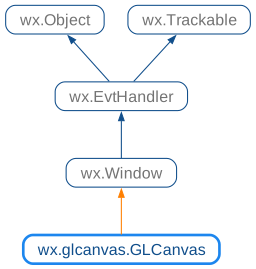
 Class Hierarchy
 Methods Summary
Default constructor not creating the window. |
|
Return the version of |
|
Return the current swap interval. |
|
Determines if a canvas having the specified attributes is available. |
|
Returns |
|
Prefer using |
|
Sets the current colour for this window (using |
|
Makes the OpenGL state that is represented by the OpenGL rendering context context current, i.e. |
|
Set swap interval to the specified value. |
|
Swaps the double-buffer of this window, making the back-buffer the front-buffer and vice versa, so that the output of the previous OpenGL commands is displayed on the window. |
 Properties Summary
A public C++ attribute of type |
 Class API
- class wx.glcanvas.GLCanvas(Window)
Possible constructors:
GLCanvas() -> None

GLCanvas(parent, dispAttrs, id=ID_ANY, pos=DefaultPosition,
         size=DefaultSize, style=0, name=GLCanvasName, palette=NullPalette) ->
         None

GLCanvas(parent, id=ID_ANY, attribList=None, pos=DefaultPosition,
         size=DefaultSize, style=0, name='GLCanvas', palette=NullPalette)
GLCanvas is a class for displaying OpenGL graphics.
Methods
- __init__(self, *args, **kw)
 Overloaded Implementations:
__init__ (self)
Default constructor not creating the window.
Createmust be used to actually create it later.- Return type:
None
Added in version 4.3/wxWidgets-3.3.0.
__init__ (self, parent, dispAttrs, id=ID_ANY, pos=DefaultPosition, size=DefaultSize, style=0, name=GLCanvasName, palette=NullPalette)
Creates a window with the given parameters.
Notice that you need to create and use a wx.glcanvas.GLContext to output to this window.
- Parameters:
parent (wx.Window) – Pointer to a parent window.
dispAttrs (wx.glcanvas.GLAttributes) – The wx.glcanvas.GLAttributes used for setting display attributes (not for rendering context attributes).
id (wx.WindowID) – Window identifier. If -1, will automatically create an identifier.
pos (wx.Point) – Window position. DefaultPosition is (-1, -1) which indicates that wxWidgets should generate a default position for the window.
size (wx.Size) – Window size. DefaultSize is (-1, -1) which indicates that wxWidgets should generate a default size for the window. If no suitable size can be found, the window will be sized to 20x20 pixels so that the window is visible but obviously not correctly sized.
style (long) – Window style.
name (string) – Window name.
palette (wx.Palette) – Palette for indexed colour (i.e. non
wx.glcanvas.WX_GL_RGBA) mode. Ignored under most platforms.
- Return type:
None
Added in version 4.1/wxWidgets-3.1.0.
__init__ (self, TransferThis, id=ID_ANY, attribList=None, pos=DefaultPosition, size=DefaultSize, style=0, name=”GLCanvas”, palette=NullPalette)
- Return type:
None
- CreateAccessible(self)
- Return type:
- static GetClassDefaultAttributes(variant=WINDOW_VARIANT_NORMAL)
- Parameters:
variant (WindowVariant)
- Return type:
- static GetGLXVersion()
Return the version of
GLXbeing used or 0 if not usingGLX.The returned value combines major and minor version numbers in a single integer, e.g. version 1.3 will be returned as 13.
This function is only available when
HAS_GLXpreprocessor symbol is defined (which will be the case for wxGTK and X11 under Unix systems).- Return type:
int
- GetSwapInterval(self)
Return the current swap interval.
Note that the swap interval is not necessarily the same as the one set by
SetSwapIntervalas the implementation may clamp it to the maximum supported value.- Return type:
int
- Returns:
The current swap interval or DefaultSwapInterval if the function is not implemented for the current platform or an error occurred.
Added in version 4.3/wxWidgets-3.3.2.
- static IsDisplaySupported(*args, **kw)
- Overloaded Implementations:
IsDisplaySupported (dispAttrs)
Determines if a canvas having the specified attributes is available.
This only applies for visual attributes, not rendering context attributes.
- Parameters:
dispAttrs (wx.glcanvas.GLAttributes) – The requested attributes.
- Return type:
bool
- Returns:
Trueif attributes are supported.
Added in version 4.1/wxWidgets-3.1.0.
IsDisplaySupported (attribList)
Determines if a canvas having the specified attributes is available.
This only applies for visual attributes, not rendering context attributes. Please, use the new form of this method, using wx.glcanvas.GLAttributes.
- Parameters:
attribList (list of integers) – See attribList for wx.glcanvas.GLCanvas.
- Return type:
bool
- Returns:
Trueif attributes are supported.
- static IsExtensionSupported(extension)
Returns
Trueif the extension with given name is supported.Notice that while this function is implemented for all of
GLX,WGLand NSOpenGL the extensions names are usually not the same for different platforms and so the code using it still usually uses conditional compilation.- Parameters:
extension (int)
- Return type:
bool
- static PreferGLX()
Prefer using
GLXover other OpenGL implementations on Unix-like systems where multiple implementations are available (such asGLXandEGL).This function is only available when
HAS_GLXpreprocessor symbol is defined (which will be the case for wxGTK and X11 under Unix systems).It must be called before using any OpenGL functionality, which includes not only creating wx.glcanvas.GLCanvas but also checking for extension support or creating attributes objects, doing it afterwards will trigger an assert failure and have no other effect.
Note that when using wxGTK with Wayland, calling this function will have no effect anyhow as only
EGLis supported in this case.Finally please note that the same effect can be achieved by setting the environment variable
_opengl_egl=0before starting the application.- Return type:
None
Added in version 4.3/wxWidgets-3.3.2.
- SetColour(self, colour)
Sets the current colour for this window (using
glcolor3f()), using the wxWidgets colour database to find a named colour.- Parameters:
colour (string)
- Return type:
bool
- SetCurrent(self, context)
Makes the OpenGL state that is represented by the OpenGL rendering context context current, i.e.
it will be used by all subsequent OpenGL calls.
This is equivalent to
wx.glcanvas.GLContext.SetCurrentcalled with this window as parameter.- Parameters:
context (wx.glcanvas.GLContext)
- Return type:
bool
- Returns:
Falseif an error occurred.
Note
This function may only be called when the window is shown on screen, in particular it can’t usually be called from the constructor as the window isn’t yet shown at this moment.
- SetSwapInterval(self, interval)
Set swap interval to the specified value.
interval specifies the minimum number of video frame periods per buffer swap, i.e. for each call to
SwapBuffers. Using the value of 0 means to disable synchronizing buffer swaps to video frames.The value may be negative to enable adaptive VSync if supported by the implementation, i.e. to allow swapping buffers without waiting for VSync when the refresh late is too low.
- Parameters:
interval (int) – The swap interval to set or the special value DefaultSwapInterval which means to turn off automatically setting it to 0 by default, as needs to be done under some platforms currently. Typical values are 1 to enable VSync, 0 to disable it and -1 to enable adaptive VSync if supported.
- Return type:
- Returns:
wx.glcanvas.GLCanvas.SwapInterval.Setif the swap interval was set successfully,wx.glcanvas.GLCanvas.SwapInterval.NotSetif setting it failed completely, e.g. if the function is not implemented for the current platform andwx.glcanvas.GLCanvas.SwapInterval.NonAdaptiveif the adaptive VSync was requested but is not supported and standard VSync was enabled instead.
Added in version 4.3/wxWidgets-3.3.2.
See also
- SwapBuffers(self)
Swaps the double-buffer of this window, making the back-buffer the front-buffer and vice versa, so that the output of the previous OpenGL commands is displayed on the window.
- Return type:
bool
- Returns:
Falseif an error occurred.
Properties
- DefaultSwapInterval
A public C++ attribute of type
constexpr int. Constant used withSetSwapIntervalandGetSwapInterval.
