
 wx.html2.WebViewEvent
A navigation event holds information about events associated with wx.html2.WebView objects.
 Events Emitted by this Class
Handlers bound for the following event types will receive a wx.html2.WebViewEvent parameter.
EVT_WEBVIEW_CREATED: Process a
wxEVT_WEBVIEW_CREATEDevent, generated when the object is fully initialized. For the backends using asynchronous initialization, such as WebViewChromium , most of this class member functions can be only used once this event is received.EVT_WEBVIEW_NAVIGATING: Process a
wxEVT_WEBVIEW_NAVIGATINGevent, generated before trying to get a resource. This event may be vetoed to prevent navigating to this resource. Note that if the displayed HTML document has several frames, one such event will be generated per frame.EVT_WEBVIEW_NAVIGATED: Process a
wxEVT_WEBVIEW_NAVIGATEDevent generated after it was confirmed that a resource would be requested. This event may not be vetoed. Note that if the displayed HTML document has several frames, one such event will be generated per frame.EVT_WEBVIEW_LOADED: Process a
wxEVT_WEBVIEW_LOADEDevent generated when the document is fully loaded and displayed. Note that if the displayed HTML document has several frames, one such event will be generated per frame.EVT_WEBVIEW_ERROR: Process a
wxEVT_WEBVIEW_ERRORevent generated when a navigation error occurs. The integer associated with this event will be a wx.html2.WebViewNavigationError item. The string associated with this event may contain a backend-specific more precise error message/code.EVT_WEBVIEW_NEWWINDOW: Process a
wxEVT_WEBVIEW_NEWWINDOWevent, generated when a new window is created. You must handle this event if you want anything to happen, for example to load the page in a new window or tab. For usage details see wx.html2.WebViewWindowFeatures.EVT_WEBVIEW_NEWWINDOW_FEATURES: Process a
wxEVT_WEBVIEW_NEWWINDOW_FEATURESevent, generated when window features are available for the new window. For usage details see wx.html2.WebViewWindowFeatures. only available in wxWidgets 3.3.0 or later.EVT_WEBVIEW_WINDOW_CLOSE_REQUESTED: Process a
wxEVT_WEBVIEW_WINDOW_CLOSE_REQUESTEDevent, generated when a window is requested to be closed. only available in wxWidgets 3.3.0 or later.EVT_WEBVIEW_TITLE_CHANGED: Process a
wxEVT_WEBVIEW_TITLE_CHANGEDevent, generated when the page title changes. Use GetString to get the title.EVT_WEBVIEW_FULLSCREEN_CHANGED: Process a
wxEVT_WEBVIEW_FULLSCREEN_CHANGEDevent, generated when the page wants to enter or leave fullscreen. Use GetInt to get the status. Not implemented for the IE backend and is only available in wxWidgets 3.1.5 or later.EVT_WEBVIEW_SCRIPT_MESSAGE_RECEIVED: Process a
wxEVT_WEBVIEW_SCRIPT_MESSAGE_RECEIVEDevent only available in wxWidgets 3.1.5 or later. For usage details seewx.html2.WebView.AddScriptMessageHandler.EVT_WEBVIEW_SCRIPT_RESULT: Process a
wxEVT_WEBVIEW_SCRIPT_RESULTevent only available in wxWidgets 3.1.6 or later. For usage details seewx.html2.WebView.RunScriptAsync.wxEVT_WEBVIEW_BROWSING_DATA_CLEARED: Process a
wxEVT_WEBVIEW_BROWSING_DATA_CLEAREDevent only available in wxWidgets 3.3.0 or later. For usage details seewx.html2.WebView.ClearBrowsingData.
Added in version 2.9.3.
See also
 Class Hierarchy
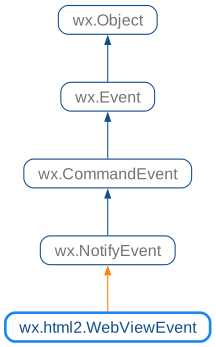
 Methods Summary
Get the name of the script handler. |
|
Get the type of navigation action. |
|
Get the name of the target frame which the url of this event has been or will be loaded into. |
|
Get information about the target window. |
|
Get the URL being visited. |
|
Returns |
|
Returns |
 Properties Summary
See |
|
See |
 Class API
- class wx.html2.WebViewEvent(NotifyEvent)
Possible constructors:
WebViewEvent() -> None

WebViewEvent(type, id, href, target, flags=WEBVIEW_NAV_ACTION_NONE,
             messageHandler="") -> None
A navigation event holds information about events associated with WebView objects.
Methods
- __init__(self, *args, **kw)
 Overloaded Implementations:
__init__ (self)
- Return type:
None
__init__ (self, type, id, href, target, flags=WEBVIEW_NAV_ACTION_NONE, messageHandler=””)
- Parameters:
type (wx.EventType)
id (int)
href (string)
target (string)
flags (WebViewNavigationActionFlags)
messageHandler (string)
- Return type:
None
- GetMessageHandler(self)
Get the name of the script handler.
Only valid for events of type
wxEVT_WEBVIEW_SCRIPT_MESSAGE_RECEIVED- Return type:
str
Added in version 4.1/wxWidgets-3.1.5.
Get the type of navigation action.
Only valid for events of type
wxEVT_WEBVIEW_NEWWINDOW- Return type:
Added in version 4.1/wxWidgets-3.1.2.
- GetTarget(self)
Get the name of the target frame which the url of this event has been or will be loaded into.
This may return an empty string if the frame is not available.
- Return type:
str
- GetTargetWindowFeatures(self)
Get information about the target window.
Only valid for events of type
wxEVT_WEBVIEW_NEWWINDOW_FEATURES- Return type:
Added in version 4.3/wxWidgets-3.3.0.
Note
This function is not implemented and always returns nullptr when using WebKit1 or Internet Explorer backend.
See also
- GetURL(self)
Get the URL being visited.
- Return type:
str
- IsError(self)
Returns
Trueif the operation failed.Only valid for events of type
wxEVT_WEBVIEW_SCRIPT_RESULTandwxEVT_WEBVIEW_BROWSING_DATA_CLEARED- Return type:
bool
Added in version 4.1/wxWidgets-3.1.6.
- IsTargetMainFrame(self)
Returns
Trueif the navigation target is the main frame.Only valid for events of type
wxEVT_WEBVIEW_NAVIGATING- Return type:
bool
Added in version 4.3/wxWidgets-3.3.0.
Note
This is only available with the macOS and the Edge backend.
Properties
- MessageHandler
- TargetWindowFeatures
